• Platform
    • Overview
      • Risk Cloud Overview
      • Spark AI
      • Value Realization Tool
      • Services & Support
      • Pricing
    • Capabilities
      • Reporting & Analytics
      • Risk Quantificaton
      • Integrations & API
      • Risk Cloud Exchange
      • Frameworks
    • img
      LogicGate Named a Leader!
      The Forrester Wave™: Governance, Risk, And Compliance Platforms, Q4 2023
      Get the Full Report
  • Solutions
    • _separator
      • AI Governance
      • Cyber Risk Management
      • Enterprise Risk Management
      • Third-Party Risk Management
      • Controls Compliance
      • Policy Management
    • _separator
      • Regulatory Compliance
      • Data Privacy
      • Operational Resilience
      • Environmental, Social & Governance
      • Internal Audit
    • 10 Purpose-Built GRC Solutions. One Connected Platform.
      View All Solutions
  • Industries
    • _separator
      • Industries Overview
      • Software
      • FinTech
      • Telecom
      • Financial Services
    • _separator
      • Insurance
      • Investment Services
      • Hospitals & Health Systems
      • Pharmaceuticals
      • Medical Devices
    • _separator
      • Oil & Gas
      • Utilities
      • Alternative Energy
  • Company
    • _separator
      • About Us
      • Careers
      • Leadership
      • Partners
    • _separator
      • News
      • Trust & Security
      • Contact Us
    • img
      LogicGate Named a Leader!
      The Forrester Wave™: Governance, Risk, And Compliance Platforms, Q4 2023
      Get the Full Report
  • Resources
    • Risk Cloud Help
      • Help Center
      • Developer Portal
    • Learn + Connect
      • Blog
      • Customer Stories
      • Resources
      • Events
      • Podcast
    • img
      LogicGate Named a Leader!
      The Forrester Wave™: Governance, Risk, And Compliance Platforms, Q4 2023
      Get the Full Report
Request A Demo
img
The Forrester Wave™: Governance, Risk, And Compliance Platforms, Q4 2023
Get the Full Report

Documentation

Menu

  • Quick Start Guides
    • Risk Cloud API: Postman
    • Risk Cloud API: Getting Started
    • Risk Cloud PowerBI Connection
    • Risk Cloud Webhooks
  • API Usage Guides
    • Risk Cloud API: Update Field Configuration
    • Risk Cloud API: Update Roles on User
    • Risk Cloud API: Update Users and Permission Sets on Role
    • Risk Cloud API: Delete Records
    • Risk Cloud API: Bulk Link Records
    • Risk Cloud API: Data Repositories
    • Risk Cloud API: Bulk Import Records
    • Risk Cloud API: Build Audit Log Export
    • Risk Cloud API: Grant Users Record Access
    • Risk Cloud API: Assign Records
    • Risk Cloud API: View Record Audits
    • Risk Cloud API: Update Record User Groups
    • Risk Cloud API: Create User Groups
    • Risk Cloud API: Export Attachments
    • Risk Cloud API: Update Records
    • Risk Cloud API: Create Records
    • Risk Cloud API: View Field Audits
    • Risk Cloud API: Moving Records
    • Risk Cloud API: Post Record Comments
    • Risk Cloud API: Export Table Report
    • Risk Cloud API: Link Records
    • Risk Cloud API: Export Step Permission Sets
    • Risk Cloud API: Export User Groups
    • Risk Cloud API: Export Roles
    • Risk Cloud API: Linked Record Search
    • Risk Cloud API: Record Search
    • Risk Cloud API: Automated Evidence Collection
    • Risk Cloud API: Pagination
    • Risk Cloud API: Authentication
    • Risk Cloud API: Export Record Data
    • Risk Cloud API: Upload Attachments
    • Risk Cloud API: View User Access Audits
    • Risk Cloud API: View Applications, Workflows, and Steps
    • Risk Cloud API: Viewing Fields
    • Risk Cloud API: Viewing Users
    • Risk Cloud API: Create Users
  • Release Notes
    • v2025.4.0 Release Notes
    • v2025.3.2 Release Notes
    • v2025.2.0 Release Notes
    • v2025.1.0 Release Notes
    • v2024.12.0 Release Notes
    • v2024.11.1 Release Notes
    • v2024.11.0 Release Notes
    • v2024.10.1 Release Notes
    • v2024.10.0 Release Notes
    • v2024.9.2 Release Notes
    • v2024.9.1 Release Notes
    • v2024.9.0 Release Notes
    • v2024.8.1 Release Notes
    • v2024.8.0 Release Notes
    • v2024.7.1 Release Notes
    • v2024.7.0 Release Notes
    • v2024.6.1 Release Notes
    • v2024.6.0 Release Notes
    • v2024.5.1 Release Notes
    • v2024.5.0 Release Notes
    • v2024.4.2 Release Notes
    • v2024.4.1 Release Notes
    • v2024.4.0 Release Notes
    • v2024.3.1 Release Notes
    • v2024.3.0 Release Notes
    • v2024.2.1 Release Notes
    • v2024.2.0 Release Notes
    • v2024.1.1 Release Notes
    • v2024.1.0 Release Notes
    • v2023.12.0 Release Notes
    • v2023.11.0 Release Notes
    • v2023.10.2 Release Notes
    • v2023.10.1 Release Notes
    • v2023.10.0 Release Notes
    • v2023.9.1 Release Notes
    • v2023.9.0 Release Notes
    • v2023.8.1 Release Notes
    • v2023.8.0 Release Notes
    • v2023.7.1 Release Notes
    • v2023.7.0 Release Notes
    • v2023.6.1 Release Notes
    • v2023.6.0 Release Notes
    • v2023.5.2 Release Notes
    • v2023.5.1 Release Notes
    • v2023.5.0 Release Notes
    • v2021.4.0 Release Notes
    • v2021.3.0 Release Notes
    • v2021.2.0 Release Notes
    • v2021.1.0 Release Notes
  • Developer Blogs
    • New Year, New Developer Relations Resources: 2024 in Review
    • New Year, New Developer Relations Resources: 2023 in Review
    • Tidying Up Existing REST APIs
    • Accessibility Improvements at LogicGate
    • What Do We Look for in Developers?
    • 2 Quick Tips I’ve learned for FE Testing as a LogicGate Dev
    • Kotlin at LogicGate
    • Spring Boot with Neo4j & MySQL
  • Case Studies
  • Home
  • Developer Resources
  • Quick Start Guides

Risk Cloud Webhooks

Updated on: January 17, 2022

Use Risk Cloud Webhooks to enhance your custom integrations and send event data to your external systems to detect Risk Cloud events and perform custom operations.

Make your custom integrations more responsive and integrated with Risk Cloud Webhooks. This feature gives you the ability to send event data from Risk Cloud to an external URL via an HTTP request when a triggering event occurs in Risk Cloud.

A Risk Cloud Webhook can be setup in the Risk Cloud as a type of Job Operation, and can be triggered based off the following detected events in your Risk Cloud environment:

  • Record Due - fires when a record is approaching or past its due date
  • Record Reassigned - fires when a record is manually reassigned
  • Record Created - fires when a record is created
  • Record Moved - fires when a record is moved to a new step in a workflow
  • Fixed Scheduled - fires at a recurring or set time

Setting up Risk Cloud Webhooks can be accomplished in the following steps:

  1. Work with your relationship manager or customer success manager to enable Risk Cloud Webhooks in your environment. NOTE: Risk Cloud Webhooks may need to be added to your Risk Cloud subscription agreement.

  2. Configure the external webhook URLs that you would like to send data to.

  3. Create jobs in Risk Cloud with your desired triggering event and use the new webhook operation to send data to your specified URL.

Configuring Webhook URLs

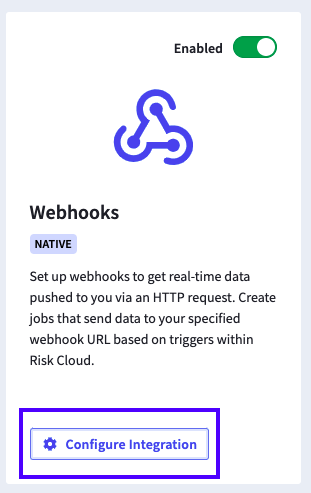
Once Risk Cloud Webhooks has been enabled in your environment, you will be able to add webhook URLs from the Admin > Integration page. Clicking “Configure Integration” will bring up a modal where you are able to add webhook URLs.
Make sure to give your webhook URLs recognizable names, as this is how they will be referenced when you create a Job.
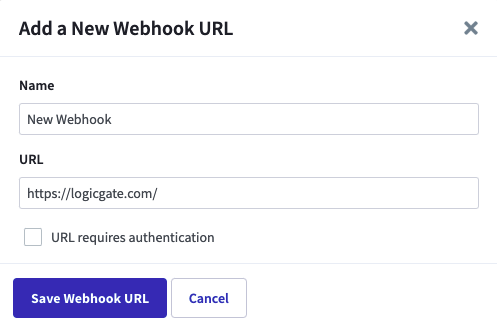
When you click “Save Webhook URL,” we will attempt to call the provided URL with a standard GET request.

If successful, your webhook will be saved and you will be presented with a one-time secret key. This key is presented only once, and can be used to ensure that data is coming from Risk Cloud.

Creating a Risk Cloud Webhook Job

Now that you have configured one or more webhook URLs, you can begin adding webhook job operations. You can learn more about creating jobs in this help article.

Once you have specified your trigger and an optional message, you will want to select the “webhook” operation. Once this operation is selected, you can specify which webhook URL should be sent data when the job is triggered. We will show you an example of what data is being sent based on the workflow/trigger that you have selected.

NOTE: No custom field data will be sent with Risk Cloud Webhooks. We are only sending event data and record/workflow identification data.

When you save your job everything will be ready for Risk Cloud to start sending event data via webhooks.

Reach out to [email protected] for additional support or your relationship manager to enable this feature.

Read Previous Quick Start Guides
Read Next API Usage Guides
  • 320 W Ohio St
    Suite 600W
    Chicago, IL 60654
  • 312-279-2775
    • LinkedIn
    • Twitter
    • Youtube
  • Looking for something specific?
  • Request A Demo
  • Platform
    • Risk Cloud Overview
    • Spark AI
    • Value Realization Tool
    • Reporting & Analytics
    • Risk Quantification
    • Integrations & API
    • Risk Cloud Exchange
    • Services & Support
    • Frameworks
    • Pricing
  • Company
    • Careers We're hiring!
    • Executive Team
    • Partners
    • LogicGate News
    • LogicGate Trust Center
    • Contact Us
  • Resources
    • Blog
    • Email Newsletter
    • Resource Center
    • Help Center
    • Developer
  • Solutions
    • AI Governance
    • Cyber Risk & Controls Compliance
    • Enterprise Risk Management
    • Third-Party Risk Management
    • Controls Compliance
    • Regulatory Compliance
    • Data Privacy Management
    • Operational Resilience
    • Policy Management
    • Environmental, Social & Governance
    • Internal Audit Management
    • View All Solutions
  • Industries
    • Software
    • FinTech
    • Telecom
    • Financial Services
    • Insurance
    • Investment Services
    • Healthcare
    • Pharmaceuticals
    • Medical Devices
    • Oil & Gas
    • Utilities
    • Alternative Energy
  • LinkedIn TwitterYoutube

Copyright © 2026. LogicGate, Inc. All rights reserved.

  • Privacy Policy
  • Information Security Measures